
Solutions · IT Operations
One operating picture for the teams that keep services running.
Operations teams lose time moving between tools to answer basic questions. PulseGrid 365 answers them where the event appears.
PulseGrid 365 · Dashboard
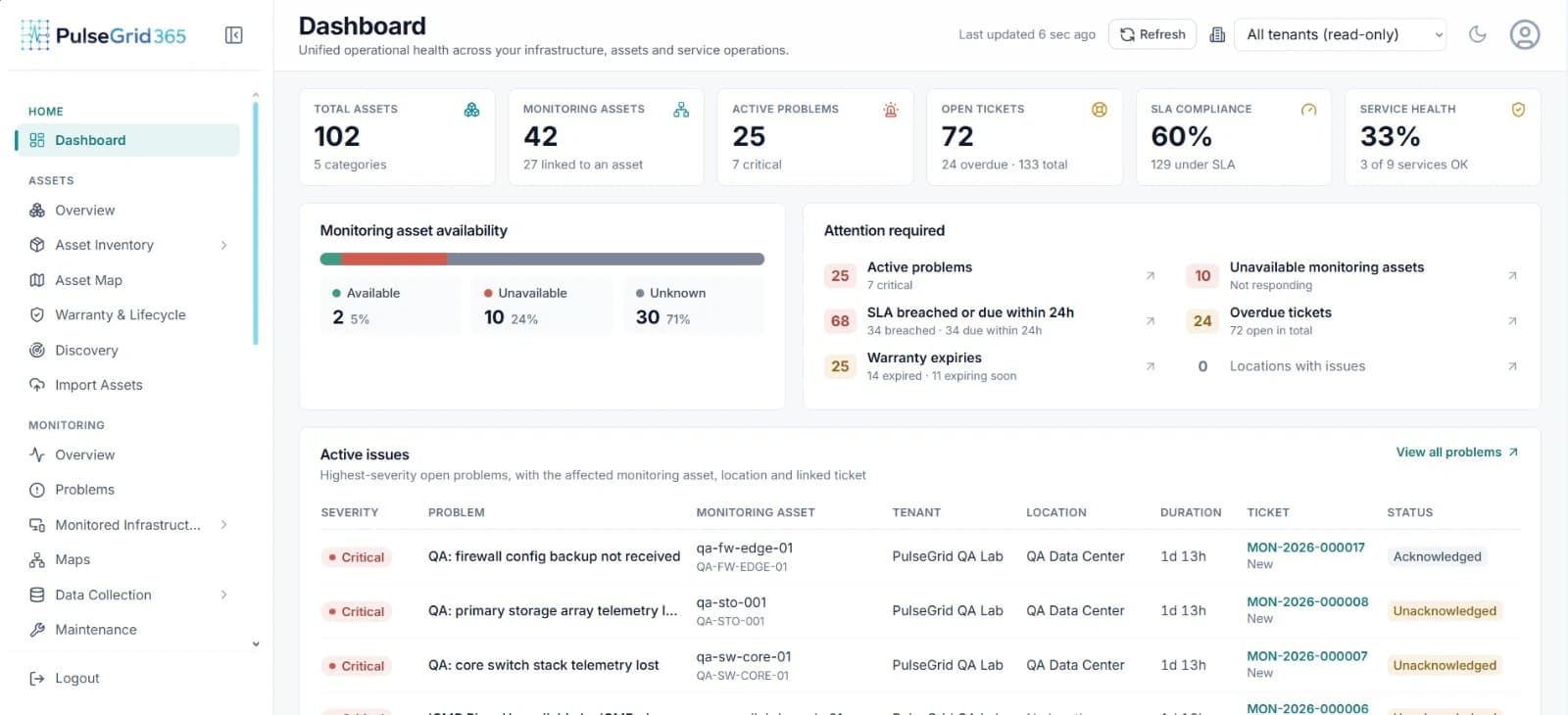
- 1Asset, monitoring and service health in one row
- 2What needs attention right now
- 3Problems linked to asset, location and ticket
Built for: IT operations managers, NOC and on-call engineers.
What changes
From the problem you have to the workflow you want.
Today
- An alert says a device is down, but not whose it is.
- Incidents are raised by hand and lose the original signal.
- Nobody can see SLA risk until it has passed.
With PulseGrid 365
- Events arrive with asset, location and owner.
- Incidents start from the event and stay linked to it.
- Priority, assignment and SLA are visible together.
The workflow
How the work flows.
The dashboard brings monitoring, assets and service health into one view.
- 01
Event
- 02
Asset context
- 03
Incident
- 04
Assignment
- 05
SLA tracking
- 06
Resolution
Modules that matter
Where PulseGrid 365 helps.
See PulseGrid in action
See how PulseGrid 365 fits your operational environment.
Tell us about your infrastructure and how your teams respond today. We will arrange a walkthrough focused on your priorities.
PulseGrid 365 · Dashboard